
Approving work
Approving a work activity is what turns a request into a commitment. It is also what makes the exclusion-zone clash rules bite, so it is worth understanding what your approval does.
Who can approve
Section titled “Who can approve”Approval needs the approve work activities permission. Head Office and Project Supervisor both have it; Subcontractor Supervisor and User do not. The full list is in Roles and permissions.
What a high-risk booking shows you
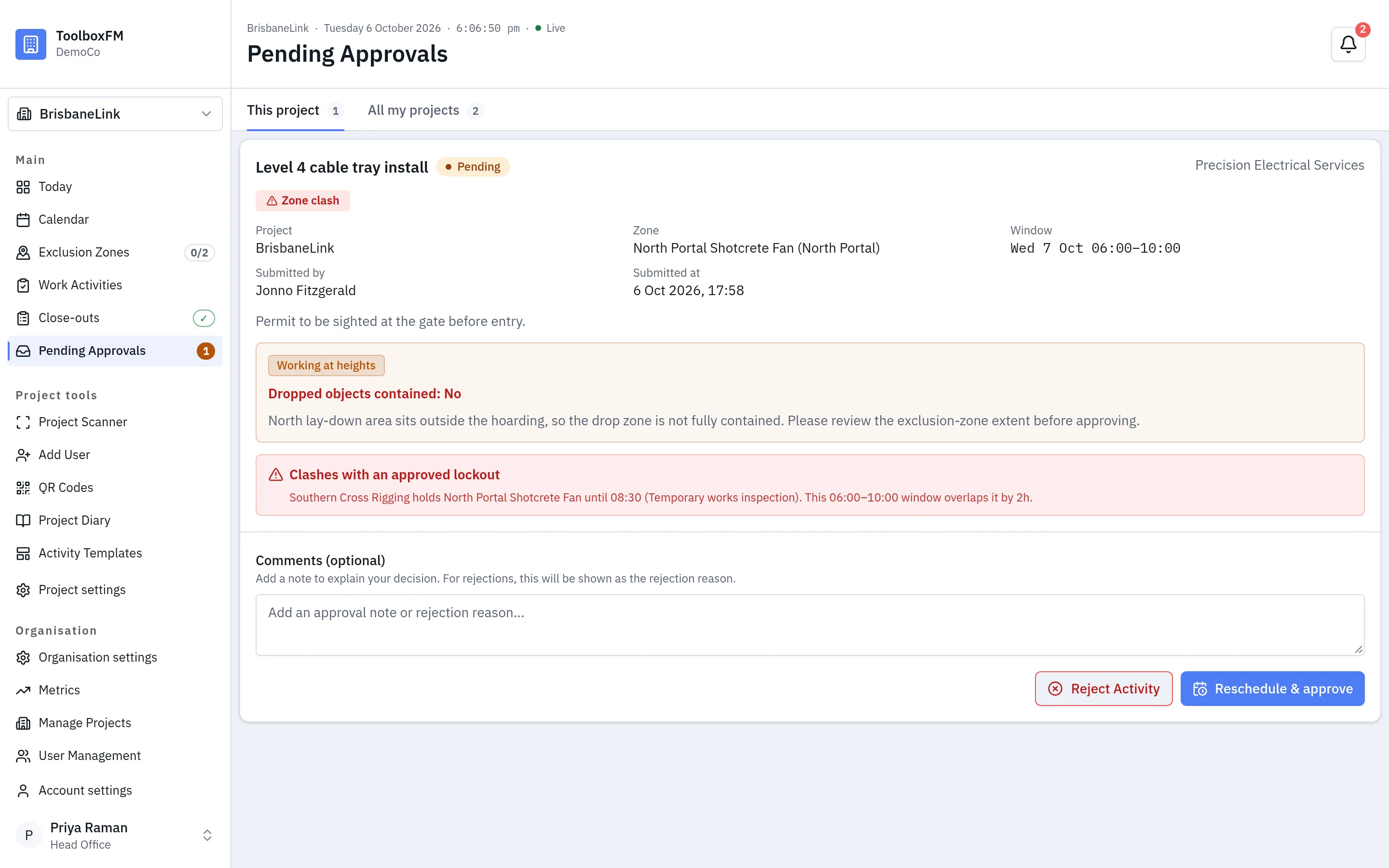
Section titled “What a high-risk booking shows you”High-risk work travels with the request into the queue. The card lists every type the crew selected, and for Working at heights, Scaffolding and Precast concrete it also shows whether the exclusion zone is large enough to contain dropped objects.
Dropped objects contained: No is not a rejection and not an error. It means the crew has told you the drop zone is not fully contained, and the comment says what to consider. Read both before you decide, then approve with a note or reject with a reason.
What approving does
Section titled “What approving does”An approved activity becomes blocking for its exclusion zone, if it has one. That means no other activity can be approved over the same zone and window.
Before that point, an activity is only a request, and requests do not block each other. Several crews may ask for the same crane slot. Nothing is wrong until somebody approves one of them.
If the window overlaps a booking that already holds the zone, the approval cannot go through. The card says Clashes with an approved lockout and names the blocking booking, and Approve Activity becomes Reschedule & approve.
Check the day board first
Section titled “Check the day board first”Because requests do not block, a zone can have more pending requests than it can satisfy. Approving one of them may leave others stranded — those activities become bumped, and their crews need telling before they travel to the project.
When an activity does become bumped, the person who created it and the supervisors of the subcontractor it belongs to are notified automatically.
If you approve the wrong one
Section titled “If you approve the wrong one”Cancel or change the winning booking and the other activity stops being bumped — again, because bumped is computed from the bookings that exist rather than recorded once.